Data analysts work with large amounts of information every day. They collect data, clean spreadsheets, run queries, create reports, build dashboards, and communicate insights to business teams. However, many of these activities can become repetitive when analysts perform them manually. This is where Python automation can make a significant difference.
Python has become an important skill for data analysts because it helps automate repetitive tasks, process datasets, clean information, generate reports, and connect different data sources. For freshers, learning Python automation can also create a strong foundation for careers in data analytics, business intelligence, data science, and technology.
If you are a beginner wondering which Python skills to learn for a data analyst career, this guide explains the most important skills and how you can use them in real-world situations.
Python automation means using Python programs or scripts to perform repetitive tasks automatically instead of completing each step manually.
For example, imagine that an analyst receives a CSV file every morning. The analyst needs to open the file, remove duplicate records, clean missing values, calculate sales totals, create a summary, and prepare a report. Instead of repeating these steps manually, the analyst can create a Python script that performs the process automatically.
As a result, Python automation can:
For freshers, understanding these practical applications is more valuable than learning Python syntax alone.
Data analysts often work with Excel, SQL, business intelligence platforms, databases, and different data sources. Although these tools are powerful, analysts may still need to perform repetitive operations between them.
Python can act as a bridge between different parts of a data workflow.
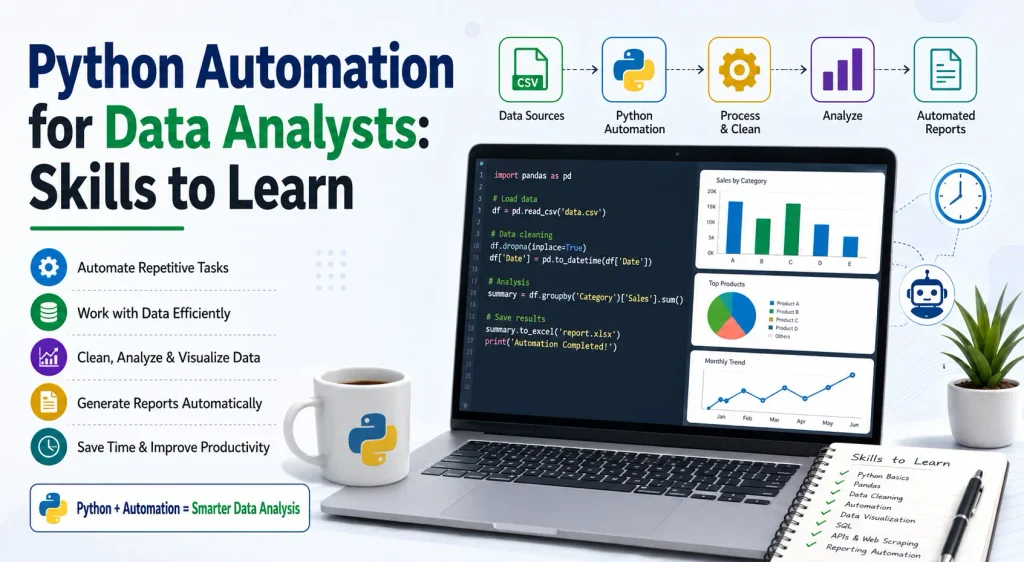
For example, an analyst can use Python to retrieve data from an API, clean it with Pandas, perform calculations, save the results to an Excel file, and generate an automated report.
Moreover, Python supports several libraries specifically designed for data analysis. Pandas provides data structures and tools for working with tabular data, including CSV, Excel, SQL, JSON, and other formats.
Therefore, Python for data analysts is not simply about programming. It is about using programming to solve everyday data problems more efficiently.
The first skill every fresher should develop is a strong understanding of Python fundamentals.
Before moving into automation, learn:
These concepts form the foundation of Python automation.
For example, loops allow you to process multiple records, while functions allow you to reuse the same operation across different datasets. Similarly, exception handling helps your automation script respond appropriately when an unexpected error occurs.
You do not need to become an advanced software developer before starting automation. Instead, focus on understanding the Python concepts that directly support data analysis and repetitive task automation.
Pandas is one of the most important Python libraries for aspiring data analysts.
It provides DataFrame and Series structures that make it easier to work with structured data. Pandas supports tasks such as filtering, sorting, grouping, merging, reshaping, cleaning, importing, and exporting data.
A fresher should learn how to:
For example, instead of manually cleaning thousands of spreadsheet records, you can create a reusable Pandas script that performs the same cleaning process whenever a new file arrives.
This makes Pandas an essential part of Python automation for data analysts.
After learning Pandas, beginners should understand the basics of NumPy.
NumPy supports numerical computing and provides efficient structures and operations for working with arrays and numerical data.
Data analysts can use NumPy for:
You do not need to learn every NumPy feature at the beginning. Instead, focus on the functions that support your data analysis workflows.
SQL remains an important skill for data analysts because companies frequently store business information in relational databases.
Therefore, learning Python automation alongside SQL can make your profile stronger.
A typical automated workflow might look like this:
Database → SQL Query → Python → Data Cleaning → Analysis → Report
For example, Python can connect to a database, execute a SQL query, retrieve the results, process the data using Pandas, and save the final output.
This combination helps freshers understand how real-world data workflows operate.
If you already know SQL, learning Python can help you move beyond manually running individual queries and toward repeatable data workflows.
Many businesses still depend heavily on Excel and CSV files. Consequently, Excel automation is an important area for data analysts.
Python can help automate tasks such as:
Suppose an organization receives 20 Excel files from different departments every month. An analyst could manually open and combine them. However, a Python automation script can process the files systematically.
This reduces repetitive work and gives analysts more time to focus on interpreting the results.
Data cleaning often consumes a significant amount of an analyst’s time.
Real-world datasets may contain:
Python can automate many of these cleaning operations.
For instance, you can create a reusable script that checks a dataset, identifies missing values, removes duplicates, standardizes text, converts dates, and prepares the data for analysis.
However, automation should not replace analytical judgment. Instead, analysts should understand the business rules before automating a cleaning process.
Data analysis does not end with cleaning and calculations. Analysts must also communicate insights clearly.
Therefore, beginners should learn Python visualization libraries such as:
These tools can help analysts create charts and visual summaries.
For example, you can automate a monthly sales analysis and generate charts showing:
This can become part of an automated reporting workflow.
Modern businesses collect information from many online services. APIs allow applications to exchange data.
A data analyst can use Python to retrieve information from APIs and incorporate that data into an analysis workflow.
For example:
API → Python → Pandas → Data Cleaning → Analysis → Dashboard
Learning API basics can therefore help freshers work with real-world data sources rather than only static datasets.
You should understand concepts such as:
This skill becomes particularly useful when organizations need automated data collection.
Sometimes analysts need information that is publicly available on websites but not provided in a convenient dataset.
Python can support web scraping and data collection workflows.
Freshers should learn the basics of:
However, analysts should always respect website terms, robots.txt policies, privacy requirements, and applicable laws when collecting information.
Web scraping should be treated as a technical skill rather than a shortcut for collecting data without restrictions.
One of the most practical applications of Python automation for data analysts is automated reporting.
Imagine that an analyst prepares the same report every Monday. The process includes collecting data, cleaning it, calculating KPIs, creating charts, and exporting an Excel file.
Instead of repeating the process manually, the analyst can create a Python workflow.
A simple automated reporting process can follow these steps:
This approach saves time and creates a consistent reporting process.
Automation becomes useful only when it works reliably.
Therefore, beginners should learn how to identify and handle errors in Python scripts.
For example, a data file may be missing, a column name may change, or a database connection may fail.
Instead of allowing the entire script to stop without explanation, you can use:
These skills help you create more dependable automation workflows.
Jupyter Notebook is useful for learning Python, experimenting with datasets, documenting analysis, and testing ideas.
Freshers can use notebooks to combine:
Once you become comfortable with notebooks, you can gradually move toward writing reusable Python scripts for automation.
You should also become familiar with basic development tools such as VS Code, Git, and virtual environments as you progress.
For freshers, projects are one of the best ways to demonstrate practical skills.
Instead of only listing “Python automation” on your resume, create projects that show how you used it.
Here are some project ideas:
Automated Excel Report Generator
Create a Python script that reads sales files, cleans the data, calculates KPIs, creates charts, and generates a final report.
CSV Data Cleaning Tool
Build a reusable script that removes duplicates, handles missing values, standardizes columns, and exports a clean dataset.
Automated Sales Dashboard Data Pipeline
Create a workflow that collects sales data, processes it with Pandas, and prepares a structured dataset for a dashboard.
API Data Analysis Project
Retrieve information from a public API, clean the JSON data, analyze it, and create visualizations.
Monthly Business Report Automation
Create an end-to-end workflow that processes monthly business data and generates an automated summary report.
These projects can help freshers demonstrate Python programming, data analysis, automation, and problem-solving skills.
If you are starting from zero, follow a structured learning path.
Stage 1: Python Basics
Learn variables, data types, loops, functions, conditions, and file handling.
Stage 2: Data Analysis
Learn Pandas, NumPy, data cleaning, data transformation, and basic statistics.
Stage 3: Database Skills
Learn SQL and understand how Python interacts with databases.
Stage 4: Visualization
Learn Matplotlib, Seaborn, or Plotly and practice creating meaningful charts.
Stage 5: Automation
Automate Excel files, CSV processing, recurring reports, API data collection, and repetitive workflows.
Stage 6: Projects
Build two to four practical projects and publish them in your portfolio.
Stage 7: Job Preparation
Practice Python interview questions, SQL problems, data analysis case studies, and project explanations.
This progression allows beginners to develop skills gradually instead of trying to learn everything at once.
Manual analysis can work for small datasets and occasional tasks. However, repeated manual processes can consume significant time.
Python automation offers several advantages:
| Manual Process | Python Automation |
|---|---|
| Repetitive work | Reusable scripts |
| Higher risk of manual errors | Consistent processing |
| Time-consuming | Faster execution |
| Difficult to repeat | Easy to rerun |
| Manual reporting | Automated reporting |
| Limited scalability | Better for larger workflows |
The goal is not to automate every analytical decision. Instead, analysts should automate repetitive technical work and spend more time understanding business problems and communicating insights.
Yes. Python automation can be a valuable skill for freshers because it combines programming with practical data analysis.
However, do not focus only on automation. A successful data analyst needs a broader skill set that includes:
Python becomes more powerful when you combine it with these skills.
For beginners, a practical learning environment can also make the process easier. Cloud Data Technologies positions its Python training around beginner-to-advanced learning, hands-on projects, data analysis with Pandas and NumPy, automation, and career preparation.
If you are a fresher, start with small tasks rather than complex projects.
First, learn Python fundamentals. Next, practice Pandas with simple datasets. Then, automate a task that you already understand manually.
For example, take a sales Excel file and create a Python program that cleans it, calculates totals, groups the results, and produces a summary report.
After that, connect Python with SQL or an API and create a larger project.
Most importantly, practice consistently. A small automation project that you fully understand can teach you more than a large project that you simply copy from the internet.
Python automation for data analysts is an important skill for freshers who want to build practical data analytics capabilities. Python allows analysts to automate repetitive tasks, clean datasets, work with Excel and CSV files, connect with databases and APIs, generate reports, and support data-driven decision-making.
Start with Python fundamentals, then learn Pandas and NumPy. After that, combine Python with SQL, visualization, Excel automation, APIs, and real-world projects. Gradually, you can move from simple scripts to complete automated data workflows.
If you are looking to build a career in data analytics, learning Python through hands-on practice can give you a stronger foundation. Cloud Data Technologies offers Python training designed around practical learning, real-time projects, and career-oriented skills for beginners and professionals.
Start learning today, build practical Python automation projects, and take the next step toward becoming a job-ready data analyst.